

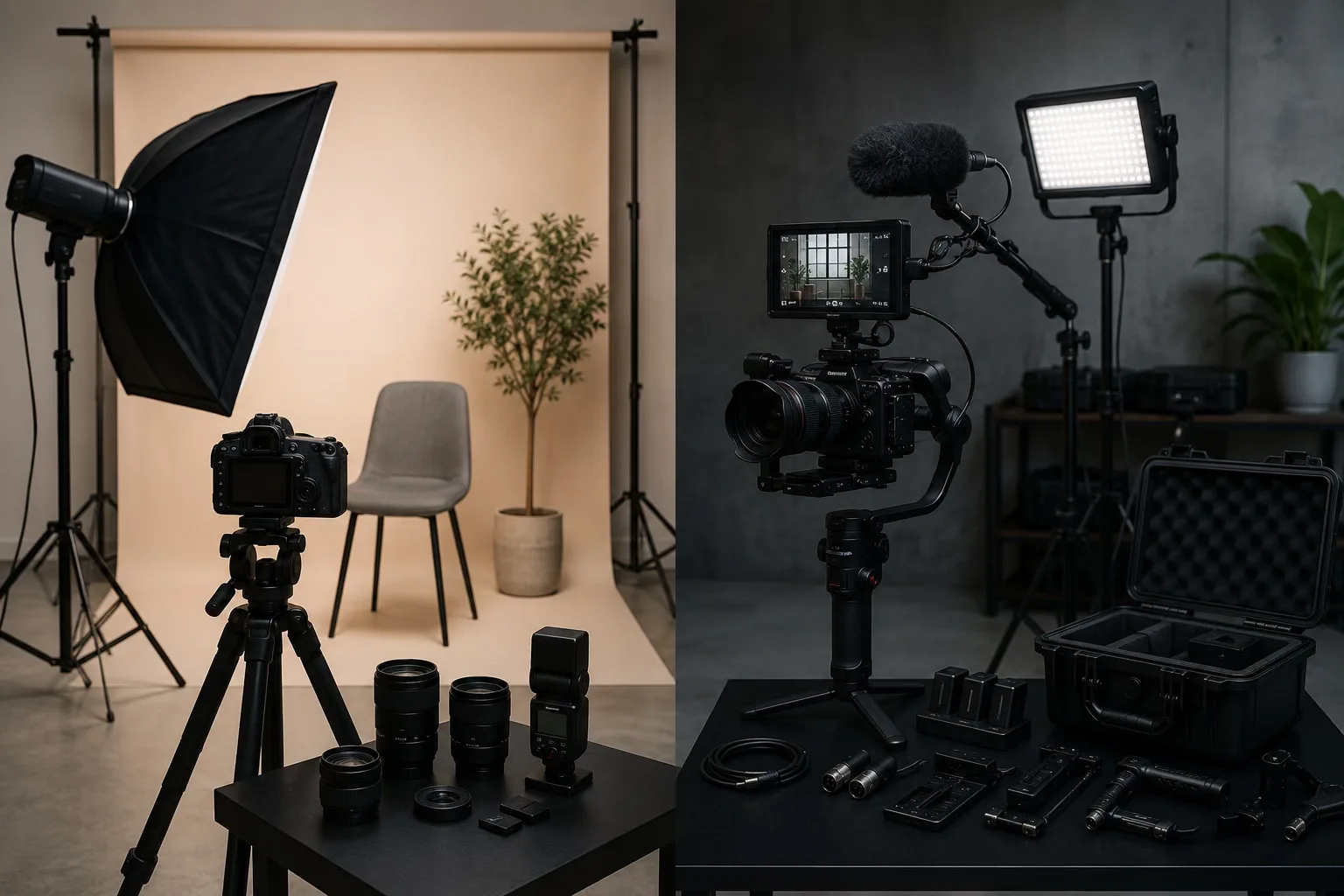
At first glance, photography and video gear can look almost the same.
A camera is still a camera.
A lens is still a lens.
A light is still a light.
So it is easy to assume that if you already have photography gear, you are almost ready to shoot professional video too.
Sometimes, that is partly true.
Modern mirrorless cameras have made the line between photography and video much thinner. Many photographers now shoot reels, behind-the-scenes clips, interviews, brand videos, and short fashion films with the same camera they use for portraits.
But once you actually start filming, the difference becomes clear very quickly.
Photography is about capturing one strong moment.
Video is about controlling everything that happens before, during, and after that moment — continuously.
That changes the gear completely.
The Short Answer
Photography gear is usually built around capturing sharp, high-quality still images.
Video gear is built around continuity.
That means video often needs more attention to:
- stable movement
- continuous lighting
- clean audio
- longer recording times
- batteries and storage
- monitoring
- camera support
- consistent exposure
A photographer can sometimes create a strong image with one camera, one lens, and one flash.
A videographer often needs a system.
Not because video is “better” or more complicated in every way, but because video has more moving parts.
The Camera Body: One Moment vs Continuous Recording
For photography, the camera body is usually judged by things like:
- resolution
- autofocus
- dynamic range
- low-light performance
- burst speed
- color quality
For video, many of those things still matter, but the priorities change.
A video camera also needs to handle:
- overheating
- recording limits
- video codecs
- frame rates
- rolling shutter
- stabilization
- audio input
- monitoring tools
- file sizes
This is why some cameras that are excellent for photography feel frustrating for video.
They may take beautiful stills, but struggle with long recording sessions, audio control, or heat management.
Cinema cameras often include features that are less common or less developed in photo-first cameras, such as internal ND filters, stronger video codecs, advanced frame-rate control, better cooling, and more production-friendly monitoring. Adorama’s comparison of cinema cameras and mirrorless cameras points out that many video-focused cameras offer advantages such as higher video resolutions, wide dynamic range, built-in ND filters, frame-rate flexibility, and less compressed recording options. :contentReference[oaicite:0]{index=0}
The difference is not always image quality.
Often, it is workflow.
Lenses: Sharpness vs Movement
Photography lenses are often chosen for sharpness, bokeh, compression, autofocus, and character.
Video lenses need those things too, but they also have to behave well during movement.
In video, small things become more noticeable:
- focus breathing
- noisy autofocus
- sudden exposure jumps
- difficult manual focus
- inconsistent lens handling
A lens that is beautiful for portraits may still be annoying for video if the focus breathing is strong or the manual focus ring is hard to control smoothly.
This is why cinema lenses exist.
They are not always sharper than photography lenses.
But they are designed for controlled focus pulls, consistent handling, accurate markings, and predictable behavior on set.
For beginners, this does not mean you need cinema lenses immediately.
It simply means that when you move into video, lens behavior matters differently.
Lighting: Flash vs Continuous Light
This is one of the biggest differences.
In photography, flash is extremely powerful because it only needs to fire for a fraction of a second.
A single strobe can freeze motion, overpower ambient light, and create a clean portrait with very little effort once you understand it.
Video is different.
The light has to stay on.
That means video lighting is usually built around continuous lights, such as LED panels, COB lights, tube lights, or practical lights in the scene.
Adorama’s guide on studio lighting for video vs photography explains that both photo and video lighting aim to create the right atmosphere, but the tools behave differently because video needs continuous illumination while photography can rely heavily on flash or strobes. :contentReference[oaicite:1]{index=1}
This changes everything:
- heat
- power consumption
- brightness
- flicker
- color accuracy
- comfort for the model
- how long the light can stay on
A flash may look perfect for a portrait.
But it does nothing for video unless it is replaced by continuous light.
Audio: The Part Photographers Often Forget
Photographers often underestimate audio.
Video beginners almost always do.
But weak audio can make even beautiful footage feel amateur.
A slightly soft image may still be usable.
Bad sound usually is not.
This is why video gear often includes:
- shotgun microphones
- lavalier microphones
- audio recorders
- headphones
- wind protection
- cables
- backup audio
Nikon’s guide to optimizing a camera for video specifically highlights that good video production is not just about pressing record; it also involves selecting the right lens, adjusting settings, and ensuring stable, high-quality audio and video. :contentReference[oaicite:2]{index=2}
This is one of the biggest mindset shifts for photographers.
In photography, silence does not matter.
In video, silence, room tone, echo, traffic, clothing noise, and microphone placement all become part of the final result.
Stabilization: A Tripod Is Not Always Enough
For photography, stabilization often means:
- a tripod
- image stabilization
- steady hands
- maybe a monopod
For video, movement itself becomes part of the visual language.
A handheld shot, a gimbal shot, a tripod shot, and a shoulder-rig shot all feel different.
This is why video gear often includes:
- gimbals
- cages
- handles
- sliders
- monopods
- shoulder rigs
- fluid-head tripods
Adorama’s guide to camera stabilizers explains that handheld stabilizers are often used by filmmakers working with lightweight DSLR or mirrorless setups, especially when they want controlled movement while keeping the camera mobile. :contentReference[oaicite:3]{index=3}
For beginners, the mistake is often buying a gimbal too early.
A gimbal can create smooth movement, but it does not automatically create good video.
Bad composition on a gimbal is still bad composition.
Sometimes a locked-off tripod shot looks more professional than a random moving shot.
Filters: Why ND Filters Matter More in Video
Photographers use filters too, of course.
But in video, ND filters become much more important.
The reason is shutter speed.
In photography, you can freely change shutter speed depending on the image you want.
In video, shutter speed is often kept close to the 180-degree shutter rule, which usually means around double the frame rate — for example, 1/50 when shooting 25fps or 1/60 when shooting 30fps.
If you want shallow depth of field outdoors, you cannot simply increase shutter speed endlessly without changing the motion feel.
That is why ND filters are essential for video.
B&H’s starter video kit guide for still photographers explains this exact problem: when shooting in bright conditions and trying to keep a wide aperture with a slower shutter speed, an ND filter becomes the effective tool to reduce exposure. :contentReference[oaicite:4]{index=4}
In simple terms:
Photo exposure is flexible.
Video exposure is more constrained.
That is why video often needs extra tools.
Batteries, Storage, and Cables: The Boring Gear That Saves the Shoot
Photography shoots can use a lot of battery and storage.
Video uses much more.
Recording continuously creates larger files, drains batteries faster, and makes overheating or memory limits more relevant.
This is why video setups often need:
- extra batteries
- larger memory cards
- SSDs
- power banks
- dummy batteries
- cable management
- backup storage
- chargers on set
It is not glamorous gear.
But it matters.
A photographer may miss one shot if a battery dies.
A videographer may lose an entire interview, scene, or take.
Monitors and Rigs: Seeing the Image Properly
For photography, the back screen or viewfinder is often enough.
For video, external monitors can become very useful.
They help with:
- focus
- exposure
- framing
- client review
- LUT preview
- camera placement
Video rigs may also include cages, handles, mounts, microphones, batteries, transmitters, and monitors.
This is where video gear starts to feel less like a camera and more like a small production system.
That does not mean every beginner needs a full rig.
But it explains why video gear often becomes physically larger than photo gear, even when using the same camera body.
Editing: One Image vs a Timeline
Photography editing is usually about selecting and refining individual images.
Video editing is about building time.
You are not just correcting color.
You are shaping:
- rhythm
- pacing
- transitions
- sound
- music
- story
- continuity
- emotion
This changes how gear is chosen.
A video shooter may care more about codecs, log profiles, bit depth, recording formats, and audio sync because those things affect the editing process later.
B&H’s Filmmaking 101 guide describes production equipment as part of a wider process that includes cameras, lenses, audio, editing, grip, and lighting — not just the camera itself. :contentReference[oaicite:5]{index=5}
That is a good way to understand the difference.
Photography gear supports the image.
Video gear supports the production.
What Can Be Shared Between Photo and Video?
The good news is that photographers do not need to start from zero.
Many tools can be shared:
- camera bodies
- lenses
- tripods
- reflectors
- softboxes
- LED lights
- backgrounds
- color grading knowledge
- composition skills
- client communication
A photographer already understands many visual principles that matter in video.
Light direction.
Framing.
Color.
Mood.
Human expression.
Those skills transfer.
But the workflow changes.
Video adds time, sound, motion, and continuity.
What Should Beginners Buy First?
If you are a photographer moving into video, do not buy everything immediately.
Start with the real problems.
A simple video starter kit could include:
- one good microphone
- one continuous LED light
- one tripod with a decent video head
- one variable ND filter
- extra batteries
- extra storage
- basic editing software
That small setup already solves more problems than most beginners expect.
Only after that should you consider:
- gimbals
- cages
- external monitors
- wireless audio
- cinema lenses
- advanced rigs
The best gear is not the most impressive gear.
It is the gear that removes friction from the kind of work you actually create.
Where FindAShoot Fits In
This difference between photography and video gear matters for creative teams too.
A model may be comfortable posing for still images, but video requires movement, timing, expression, and sometimes speaking.
A photographer may understand lighting, but video may need a videographer, sound person, or editor.
A makeup artist may prepare skin differently if the subject will move under continuous light for several hours.
A stylist may choose clothes differently if fabric movement matters.
That is why creative platforms are not only about finding “a photographer” or “a model.”
They are about building the right team for the type of production.
FindAShoot can help photographers, videographers, models, MUAs, stylists, and other creatives connect around projects with clearer roles and expectations.
Because sometimes the question is not only:
“What gear do I need?”
It is also:
“Who do I need on set?”
Final Thoughts
Photography and video gear may look similar at first.
But they solve different problems.
Photography is about capturing the moment.
Video is about sustaining the moment.
That means image, sound, movement, exposure, power, storage, and teamwork all become part of the same system.
If you already shoot photos, you are not starting from zero.
You already understand visual language.
But when you move into video, the camera becomes only one part of a larger workflow.
And once you understand that, buying gear becomes much easier.
You stop asking:
“What looks professional?”
And start asking:
“What helps me create the work properly?”
💬 Comments · 0 comments
Be the first to comment.